

Choosing the wrong medical billing software doesn’t just create headaches. It costs you real money. With initial claim denials reaching 11.81% in 2024 and administrative complexity growing across every specialty, this medical billing software selection guide exists to help you cut through vendor noise and make a decision grounded in your actual practice data. You’ll get a practical evaluation framework, integration testing strategies, and the specific questions to ask before you sign anything.
Table of Contents
- Key Takeaways
- Understanding your practice’s billing baseline first
- Key features that actually move the needle
- Integration and interoperability with your existing systems
- Evaluating vendor fit beyond the feature list
- Common pitfalls that derail software selection
- My honest take on what actually matters
- How Quelinbilling helps you get this right
- FAQ
Key Takeaways
| Point | Details |
|---|---|
| Start with your own data | Use 6 to 12 months of baseline metrics to define what the software must actually fix. |
| Prioritize denial prevention | Real-time claim scrubbing before submission prevents revenue loss more effectively than post-denial tools. |
| Test integration with your EHR | Demand a live demo using your own data to expose workflow gaps no marketing deck will show. |
| Evaluate total cost of ownership | Pricing models vary widely; hidden fees in training and implementation can dwarf the sticker price. |
| Involve your whole team | Frontline billing staff and clinicians must test usability before any contract is signed. |
Understanding your practice’s billing baseline first
Before you evaluate a single vendor, you need to know exactly where your revenue cycle is bleeding. Skipping this step is the most common reason practices end up with software that looks great in a demo but solves the wrong problems.
Gather at least 6 to 12 months of baseline data before you begin any evaluation. The metrics that matter most are:
- Clean claim rate: What percentage of your claims go out clean the first time?
- Denial rate by payer: Which insurers are rejecting the most, and why?
- Days in accounts receivable (AR): How long does it take to collect after a claim is submitted?
- Net collection rate: Are you actually collecting what you’re contractually owed?
- Cost to collect: What does each dollar of revenue cost you to bring in?
Once you have those numbers, you can match technology capabilities to specific problem areas. For example, if eligibility denials are your top denial category, you need automated eligibility verification that runs before the patient even walks in the door, not just a dashboard that shows you the denial after the fact.
Practice size and specialty complexity matter here too. A 3-provider family medicine clinic has fundamentally different volume, coding complexity, and payer mix than a 20-provider orthopedic group. Evaluate your practice size and specialty before assessing scalability requirements, because software that works beautifully for one practice type can create friction in another.
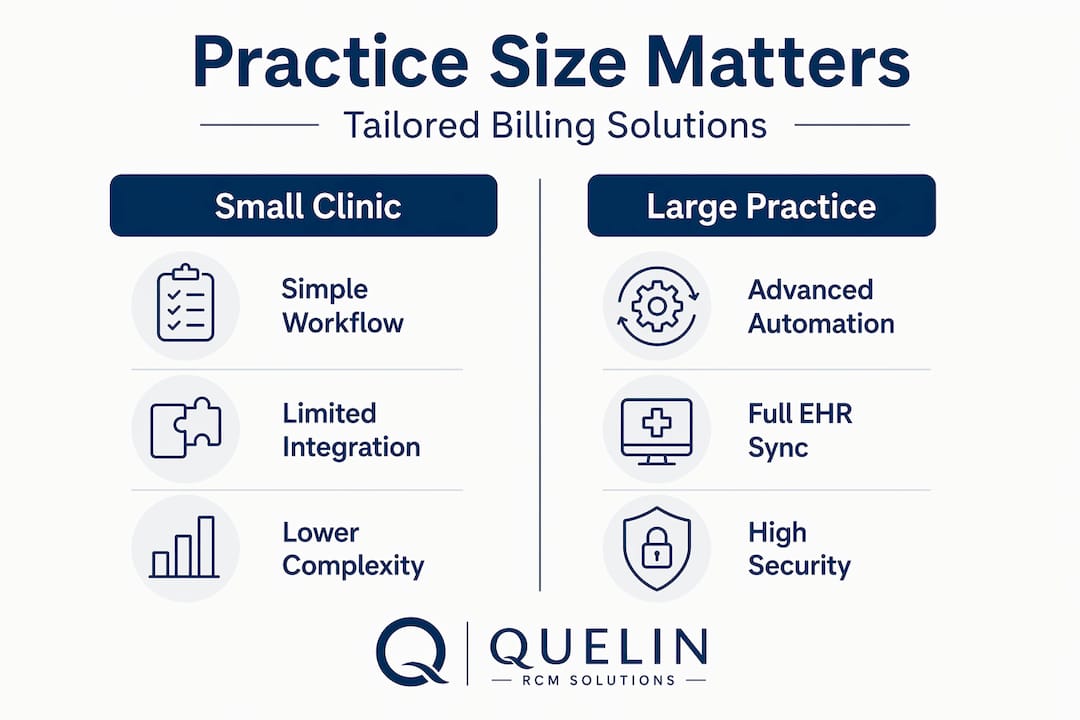
Pro Tip: Build a one-page problem statement that maps your top three denial categories to the specific software capabilities needed to address them. Bring this document to every vendor demo and require them to show you exactly how their platform handles each scenario.
Key features that actually move the needle
Not every feature in a billing platform is worth paying for. The ones below have a direct, measurable impact on your revenue cycle. Everything else is nice to have.
The non-negotiables in any billing software comparison start with automation. Workflow automation in claims processing, payment posting, and eligibility verification reduces the manual touchpoints where errors enter the system. Less manual entry means fewer rejections and faster cash flow.
Real-time claim scrubbing is where the real money lives. Claim scrubbing before submission catches coding errors, missing modifiers, and payer-specific rule violations before they become denials. Post-denial cleanup is expensive and slow. Prevention is always cheaper.
Here are the core features to evaluate in any top billing software for healthcare:
- Automated eligibility verification integrated with your scheduling workflow, not a separate manual lookup
- Rules-based claim editing that applies payer-specific logic before submission
- Denial management module with root cause categorization, not just a list of rejected claims
- Reporting dashboards that track financial KPIs and let you drill down by payer, provider, and denial category
- HIPAA-compliant security including data encryption, audit trails, and documented breach response procedures
- Cloud-based architecture for accessibility, automatic updates, and reduced IT overhead
On the cloud versus on-premise question: cloud-based platforms now dominate the market for good reason. They eliminate local server maintenance, update automatically with payer rule changes, and allow your billing team to work from anywhere. On-premise solutions can make sense for very large health systems with specific data sovereignty requirements, but for most practices, cloud is the right call.
Pro Tip: When a vendor claims their automation reduces denials by a specific percentage, ask for the methodology behind that number. Request client-specific data from practices similar to yours in size and specialty, not aggregate marketing statistics.

Integration and interoperability with your existing systems
Software that doesn’t talk to your EHR creates more work, not less. This is the section most practices underestimate during evaluation, and it’s often where implementations fall apart after go-live.
Bidirectional real-time data flow between your billing platform and EHR is the baseline requirement. Patient demographics, diagnosis codes, procedure codes, and payment information need to move between systems without manual re-entry. Every manual transfer is a potential error and a staff hour you’re paying for unnecessarily.
Here’s how to evaluate integration quality during your vendor process:
- Ask whether the integration is native or middleware-dependent. Native integrations built directly between two platforms are more reliable and require less maintenance than third-party middleware connectors.
- Verify support for current data standards. Look for HL7 FHIR API support, which is the modern standard for healthcare data exchange and increasingly required by payers and regulators.
- Test with your actual EHR. Don’t accept a demo built on a generic test environment. Require the vendor to demonstrate the integration using a de-identified version of your own patient and billing data.
- Confirm clearinghouse connections. Your software needs established relationships with major clearinghouses to submit claims to the full range of payers you work with.
- Check patient portal and lab connectivity. The broader the interoperability, the less your staff has to manually pull data from separate systems.
The workflow efficiency gains from integrated billing only materialize when the data flow is genuinely bidirectional and real-time. A system that syncs once a day is not an integrated system. It’s a slightly automated manual process.
Pro Tip: Insist on an end-to-end workflow demonstration that starts with patient scheduling and ends with payment posting. If the vendor can’t show you that complete cycle using realistic data, that’s a significant warning sign.
Evaluating vendor fit beyond the feature list
Features get you in the door. Vendor fit determines whether the software actually works for your practice two years after implementation. These factors are less exciting than feature comparisons, but they matter more to your long-term results.
Pricing structures in the billing software market vary widely, and the sticker price rarely tells the whole story. Pricing models include per-claim fees, per-provider monthly subscriptions, and percentage-of-collections arrangements. Each model has different implications depending on your volume and collection rate. Ask specifically about:
- Implementation and data migration fees
- Training costs for new staff
- Fees for additional users or locations
- Contract length and early termination penalties
- Costs for software updates or new feature modules
Security deserves more scrutiny than most practices give it. HIPAA compliance requires encryption, audit logging, and documented breach response procedures. But compliance documentation is the floor, not the ceiling. Ask vendors how they handle a breach in practice, not just in their policy PDF. Cyberattacks on healthcare practices are increasing, and your billing software holds some of the most sensitive data in your organization.
Support quality is another area where practices often get surprised after signing. Ask whether your account will have a dedicated support contact or a general help desk queue. Find out average response times for critical issues. A billing system outage during a high-volume week is a serious financial event, and you need to know exactly how the vendor responds.
Pro Tip: Contact at least two or three references from practices similar to yours in specialty and size. Ask them specifically about the implementation experience, support responsiveness, and whether the software delivered on the vendor’s promises.
Common pitfalls that derail software selection
Even experienced administrators make predictable mistakes during the selection process. Knowing them in advance puts you in a much stronger position.
The biggest trap is evaluating software based on a polished generic demo. Vendors should demonstrate a specific patient encounter through the entire billing lifecycle using data that resembles your actual workflows. Generic demos are designed to show strengths and hide limitations. Your real data will expose both.
A second common mistake is letting price drive the final decision. The lowest monthly fee often comes with the highest total cost of ownership once you factor in implementation time, staff retraining, and the revenue lost during a rocky go-live period.
Here’s a quick comparison framework to use when evaluating your shortlisted options:
| Evaluation Factor | What to look for | Red flag |
|---|---|---|
| Denial management | Payer-specific root cause reporting | Only shows overall denial rate |
| Integration | Native EHR connection, real-time sync | Middleware-only, batch sync |
| Automation | Pre-submission scrubbing, auto-posting | Manual workarounds required |
| Security | Encryption, audit logs, breach protocol | Compliance PDF only |
| Support | Dedicated contact, defined SLAs | General help desk only |
| Pricing transparency | Full cost breakdown upfront | Fees disclosed only in contract |
Frontline staff usability is chronically underweighted in selection decisions. The billing team using the software eight hours a day will find friction points that no administrator sees in a 90-minute demo. Build structured usability testing into your process and follow medical billing best practices when setting evaluation criteria.
Pro Tip: Build a side-by-side demo checklist tied directly to your problem statement. Score each vendor on how specifically they address your top denial categories, not on overall feature count.
My honest take on what actually matters
I’ve worked with healthcare practices across specialties during software evaluations, and the pattern I see most often is this: practices spend 80% of their evaluation time on features and 20% on integration, when it should be the opposite.
The features in most billing platforms are more similar than vendors want you to believe. What separates a good implementation from a painful one is almost always the integration quality and the vendor’s willingness to prove it with your actual data before you sign.
I’ve also seen practices choose software based on denial management dashboards that look impressive in a demo but only report aggregate denial rates. Payer-specific denial tracking is what actually lets you fix the problem, because denial rates range from 5% to 27% depending on the payer. An aggregate number tells you almost nothing about where to focus your effort.
The other thing I’d push back on is the assumption that more automation equals better outcomes. Automation built on top of a poor integration creates automated errors at scale. Get the integration right first. Then layer automation on top of it.
User adoption is the factor that determines whether you realize any return on your investment. An interface your billing team finds confusing will be worked around, not used. Involve your frontline staff in the demo process and weight their feedback heavily. They will tell you things no feature checklist captures.
Rushing this decision because a vendor is offering a limited-time discount is almost always a mistake. The software you choose will shape your revenue cycle for three to five years. Take the time to do this right.
— Quelin
How Quelinbilling helps you get this right
If you’ve worked through this guide and realized that the real challenge isn’t just choosing software but making sure it performs the way it’s supposed to, that’s exactly where Quelinbilling comes in.
Quelinbilling’s certified billing specialists work alongside your existing technology to close the gap between what software promises and what it delivers. With a 96% clean claims ratio and a 98.5% first pass resolution rate, Quelinbilling brings the kind of verified performance to your revenue cycle that no software demo can replicate on its own. Whether you need help optimizing your revenue cycle or want expert support layered on top of your current platform, Quelinbilling’s team handles the complexity so your providers can focus on patients. Explore how Quelinbilling’s billing services integrate with your practice and start recovering the revenue your current process is leaving behind.
FAQ
What is the most important factor in choosing billing software?
Integration with your existing EHR is the single most critical factor. Software that doesn’t sync bidirectionally in real time creates manual rework that offsets any efficiency gains from automation.
How do I compare medical billing software options effectively?
Build a problem statement that maps your top denial categories to specific software capabilities, then score each vendor on how directly they address those specific issues during a live demo with your own data.
What pricing model is best for medical billing software?
There’s no universal answer. Per-provider monthly pricing offers predictability for stable practices, while percentage-of-collections models align vendor incentives with your revenue performance. Always calculate the total cost of ownership, not just the base fee.
How do I know if a vendor’s security is actually HIPAA compliant?
Go beyond the compliance documentation. Ask specifically how the vendor handles encryption at rest and in transit, how audit logs are maintained, and what their documented process is for managing a data breach from detection through notification.
Should small practices use the same criteria as large ones?
The core evaluation framework applies to any size, but practice size and specialty should shape your priorities. Smaller practices often need simpler interfaces and lower implementation overhead, while larger groups need stronger multi-provider reporting and scalability.
Recommended
- How To Choose The Best Medical Billing Service Provider | Quelin RCM Solution
- Medical Billing Best Practices for Providers
- Top 10 Best Medical Billing Software List | Medical Billing Software | Quelin RCM Solution
- The Complete Guide to Medical Billing and Coding: Processes, Challenges, and Opportunities | Quelin RCM Solution