
Running an independent healthcare practice means wearing too many hats at once. Billing errors pile up, appointment slots go unfilled, and your front desk staff is buried in paperwork that should take minutes but takes hours. Understanding what is practice management software, and how it solves these exact problems, is the first step toward reclaiming that lost time. The practice management software market was valued at USD 12.73 billion in 2025 and is projected to reach USD 20.75 billion by 2031, which tells you how fast independent practices are making the switch.
Navigating Your Practice Management Software Guide
- Key takeaways
- What practice management software actually is
- Core features of practice management software
- Benefits of adopting practice management software
- How practice management software works day to day
- My take on what practices get wrong about PMS
- How Quelinbilling enhances what your PMS starts
- FAQ
Key takeaways
| Point | Details |
|---|---|
| PMS is your operational backbone | Practice management software coordinates scheduling, billing, communications, and reporting into one unified system. |
| It differs from EHR software | PMS handles administrative and financial tasks; EHR handles clinical documentation. Both work best together. |
| Integration is the real differentiator | The value of PMS comes from how well it connects to your existing EHR and billing workflows, not just its feature list. |
| Benefits go beyond efficiency | Faster reimbursements, fewer no-shows, and better patient communication all flow from a well-configured PMS. |
| Workflow design matters most | Choosing the right software is only half the job. Mapping your patient-to-cash process determines your actual results. |
What practice management software actually is
Think of practice management software (PMS) as the operational backbone of your practice. It connects the administrative dots: who is coming in, when they are scheduled, what services they received, how much they owe, and whether the insurance claim was paid. Without it, each of those steps often lives in a different tool, a different spreadsheet, or in someone’s memory.
PMS is not the same as an Electronic Health Record (EHR). This distinction matters. EHR software focuses on clinical documentation: patient histories, diagnoses, treatment notes, prescriptions. PMS handles the business side: scheduling, registration, billing, claims, and reporting. Most modern practices need both, and the best setups integrate the two so data flows automatically without anyone re-entering information.
Here is what PMS coordinates on a daily basis:
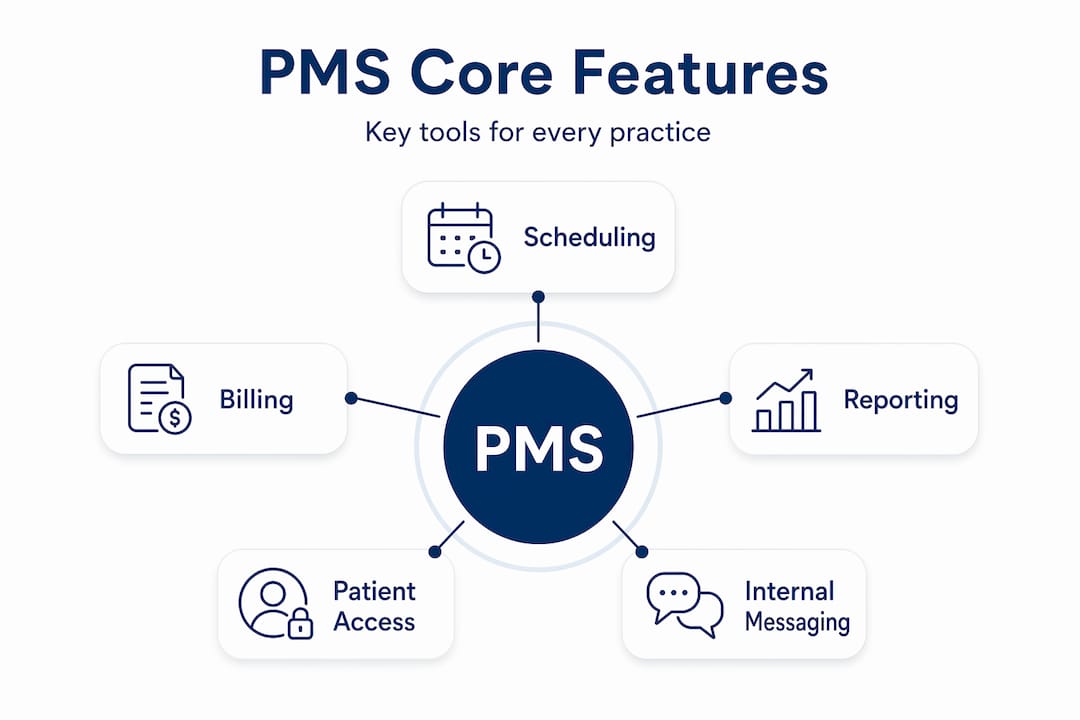
- Patient scheduling and registration: Automated appointment booking, intake forms, and insurance verification before the patient even walks through the door
- Billing and claims management: Generating claims, submitting them to payers, tracking denials, and posting payments
- Communications: Automated appointment reminders, recall notifications, and internal messaging between staff
- Reporting and analytics: Revenue reports, productivity dashboards, and payer performance data
- Document management: Storing patient forms, authorizations, and correspondence in one accessible location
Pro Tip: If you are evaluating PMS options, ask vendors specifically how data transfers between the PMS and your EHR. Seamless two-way integration eliminates the duplicate data entry that drains front-desk productivity.
Core features of practice management software
The features of practice management software fall into a few clear categories, and knowing what each one does helps you evaluate which tools actually match your workflow versus which ones just look impressive in a demo.
Scheduling and patient access
A good PMS includes an online appointment scheduling portal that patients can use at any time, not just during office hours. This reduces inbound call volume significantly. Automated reminders via text or email are tied directly to the schedule, which reduces no-show rates and improves resource utilization across the day.
Billing and revenue cycle tools
This is where independent practices either win or lose financially. PMS handles insurance eligibility checks before appointments, generates claims automatically after a visit is coded, tracks claim status with payers, manages denials, and posts payments. For practices trying to get this right, reviewing medical billing best practices alongside your PMS setup will show you where your workflow gaps are.

Reporting and financial visibility
| Feature | What it tracks | Why it matters |
|---|---|---|
| Revenue dashboards | Collections, charges, adjustments | Shows whether billing is keeping pace with services |
| Denial reports | Claim rejection reasons by payer | Identifies patterns to fix before they compound |
| Scheduling reports | Appointment volume, no-show rates | Highlights gaps in utilization and staff planning |
| Aging reports | Outstanding balances by age | Flags accounts receivable issues before they become write-offs |
Pro Tip: Run your denial report weekly, not monthly. By the time a monthly report surfaces a denial pattern, you may have submitted dozens of additional claims with the same error.
PMS features commonly include online scheduling, automated reminders, claims processing, billing, and internal communications tools, all working together inside a single platform rather than across disconnected apps.
Benefits of adopting practice management software
The benefits of practice management software are measurable, not just theoretical. Here is where independent practices typically see the most direct impact:
-
Reduced administrative workload. Automation through PMS allows staff to spend less time on manual tasks and more time on actual patient care. This matters because 87% of healthcare professionals work late weekly due to administrative burdens. A PMS cuts into that number directly.
-
Faster reimbursements. When claims are generated cleanly from accurate scheduling and registration data, fewer claims require correction or resubmission. Your billing cycle shortens, and cash flow improves.
-
Fewer missed appointments. Automated reminders give patients multiple touchpoints before their visit. Practices using PMS-driven reminders consistently see lower no-show rates without adding any staff time to the process.
-
Better patient communication. Beyond reminders, PMS handles recall campaigns, balance notifications, and intake forms. Patients experience a more organized practice, which builds trust and retention.
-
Data-driven decisions. When your scheduling, billing, and communication data all live in one place, you can actually see what is working. Which payers are slow? Which appointment types generate the most denials? PMS answers these questions with reports instead of guesswork.
Understanding how billing and patient care connect is critical when evaluating PMS options. Practices that treat billing as separate from clinical operations consistently underperform compared to those that integrate the two.
How practice management software works day to day
Understanding how practice management software works in a real workflow helps you see where it creates the most value. The patient-to-cash lifecycle is the right frame for this.
It starts at registration. When a patient books an appointment, PMS captures demographics, insurance information, and consent forms. Eligibility verification runs automatically. By the time the patient arrives, your front desk already knows their coverage details.
After the visit, the provider documents in the EHR, and those clinical notes trigger the billing side in the PMS. Codes are applied, a claim is generated, and it is submitted to the payer. Workflow transitions between front desk and billing teams need to be clean and clearly defined, because this is where revenue leaks most often occur.
Many independent practices run hybrid software stacks combining their EHR for clinical documentation and PMS for operations. When these systems are well integrated, duplicate data entry disappears and automation reaches its full potential. When they are not, staff manually reconciles data between systems, which creates errors and eats hours.
A few common pitfalls to avoid during implementation:
- Skipping workflow mapping. Do not configure PMS around how the software works by default. Map your existing patient-to-cash process first, then configure the software to match your logic.
- Undertraining front desk staff. Billing accuracy starts at registration. If front desk staff enter insurance data incorrectly, every downstream step suffers.
- Ignoring integration testing. Before going live, run a full patient scenario from booking through payment posting to verify data moves correctly between PMS and EHR.
- Overlooking denial management setup. Most PMS platforms include denial tracking, but you have to configure the rules and alerts. Out-of-the-box settings are rarely enough.
Effective integration reduces errors and manual reconciliation, which is the core value of combining EHR and PMS in a well-designed stack. Getting this right from the start saves months of cleanup later.
Pro Tip: Ask your PMS vendor for a sandbox environment before signing. Walk your billing team through a full claim cycle in the test environment. Real feedback from your billing staff before go-live is worth more than any demo.
My take on what practices get wrong about PMS
I have worked with enough healthcare practices to know that the software selection conversation almost always overshadows the workflow design conversation. And that is backwards.
When practices call us asking which PMS is the best, what they really need to answer first is: how does your patient encounter become a paid claim today, and where does it break down? I have seen practices running top-tier software with terrible results because nobody mapped the handoff between the front desk and billing. I have also seen practices on modest platforms collecting efficiently because their workflows were thought through.
The other thing I hear constantly is that automation will solve the problem. Automation helps enormously, and the AI-driven features entering PMS platforms in 2025 and 2026 are genuinely impressive. But automation amplifies whatever workflow you feed it. If your registration process captures bad insurance data, your automated claims process submits bad claims faster than ever before.
My honest advice: spend as much time designing your workflows as you spend evaluating features. Then choose a PMS with strong integration capability, particularly one that connects cleanly to your billing team or billing service. Features matter, but connected systems that work together are what actually move revenue.
— Quelin
How Quelinbilling enhances what your PMS starts
Practice management software creates the framework, but collecting revenue consistently requires more than setup. Quelinbilling works alongside your PMS to handle the billing complexity that software alone cannot resolve. With a 96% clean claims ratio and a 98.5% first-pass resolution rate, Quelin’s certified specialists take over where automation reaches its limits: denial appeals, payer-specific coding rules, and payment reconciliation. If you want to see how expert billing support fits into your PMS workflow, explore how billing services improve patient care and financial performance together. The combination of the right software and the right billing team is where independent practices find their strongest results.
FAQ
What is practice management software used for?
Practice management software coordinates the administrative and financial operations of a healthcare practice, including scheduling, billing, claims processing, and reporting. It acts as the central system connecting front-desk workflows to the billing cycle.
How is PMS different from EHR software?
PMS handles operational and financial tasks like billing and scheduling, while EHR software manages clinical documentation such as patient records and treatment notes. Most practices use both systems together, integrated to reduce duplicate data entry.
What should I look for in practice management software?
The most important factors are integration capability with your existing EHR, billing workflow support, denial management tools, and reporting features. A strong integration with your billing team or service matters as much as the feature set itself.
What are the main benefits of practice management software?
The primary benefits include reduced administrative workload, faster insurance reimbursements, lower no-show rates through automated reminders, and better visibility into practice performance through reporting dashboards.
Is cloud-based practice management software better for small practices?
Cloud-based practice management software is generally better for independent practices because it reduces upfront IT costs, allows remote access, and receives updates automatically. Most modern PMS platforms are cloud-based for exactly these reasons.
Recommended
- Top 10 Best Medical Billing Software List | Medical Billing Software | Quelin RCM Solution
- Top 10 EHR Systems (2025): Revolutionizing Healthcare Management | Quelin RCM Solution
- Top Medical Billing Trends: AI Integration, Patient-Centric Practices, and Value-Based Care | Quelin RCM Solution
- Medical Billing Best Practices for Providers